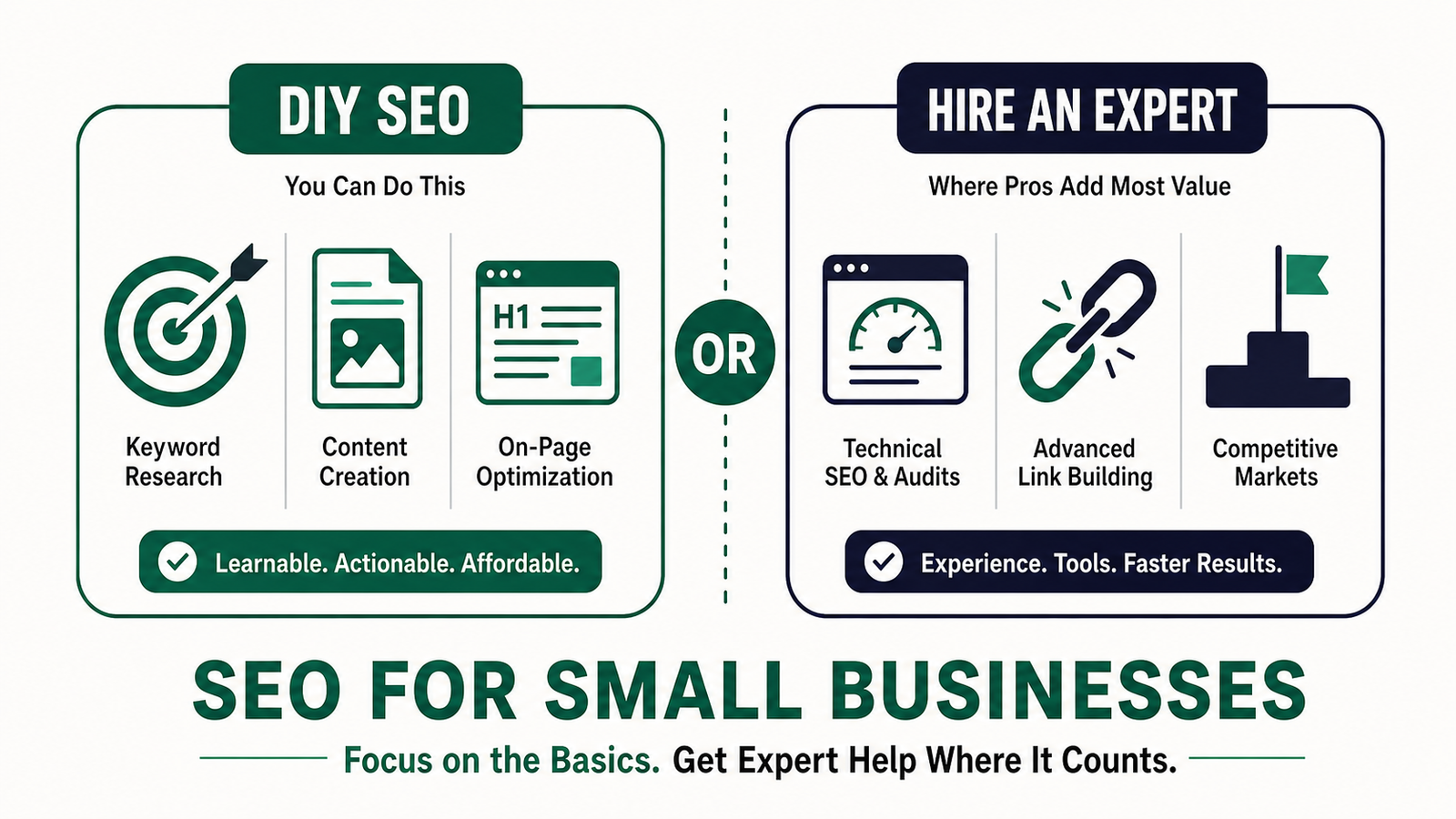
- You can do SEO yourself, especially keyword research, on-page optimization, content creation, and Google Business Profile management
- Technical audits, advanced link building, and page speed optimization are worth outsourcing
- Free tools to start with: Google Search Console, Google Analytics, and Google Business Profile
- Paid tools worth considering: SEMrush and Screaming Frog
- Expect first signs of movement in four to eight weeks, meaningful ranking gains in three to six months
- Biggest beginner mistakes is targeting keywords that are too competitive
- If months of consistent effort produce zero movement, that’s when you bring in a professional
Every month, small business owners pour serious money into SEO agencies and a frustrating amount of it goes nowhere. Rankings don’t move, leads don’t come in, and the only thing that grows is the monthly invoice.
A big portion of what you’re paying for isn’t magic. It’s learnable, and in many cases, doable on your own.
I’ve spent years working with local businesses and online stores across keyword research, technical SEO, content strategy, and link building. I’ve watched owners waste thousands on agencies that delivered nothing, and I’ve seen others build real, consistent organic traffic with a few focused hours each week.
The difference usually isn’t budget. It’s knowing what actually matters.
This guide covers what SEO really involves, which parts are realistic to handle yourself, where professional help genuinely earns its cost, and how to make that call confidently.
What Is SEO and Why Does It Matter for Your Business
SEO stands for Search Engine Optimization, and at its core it’s the practice of making your website show up when someone searches for your service or product. Not through paid ads, but organically, meaning you earn that placement through relevance and credibility rather than buying it.
The numbers behind this matter. The number one organic result in Google earns an average click-through rate of 27.6%, which is roughly ten times more clicks than the top paid ad on the same page.
Around 46% of all Google searches are looking for local information, and people searching for a local service are often ready to hire within 24 hours. If your business isn’t showing up in those moments, you’re invisible to customers who are actively looking for you.
What makes SEO particularly appealing for small businesses is the long-term return. Ads stop working the moment you stop paying. A well-optimized page can bring in consistent traffic for years.
About 55% of micro-business owners report managing at least some of their SEO themselves, which tells you this isn’t something reserved for technical specialists with computer science degrees.
How Search Engines Actually Work
Search engines like Google run on a three-step process: crawling, indexing, and ranking.
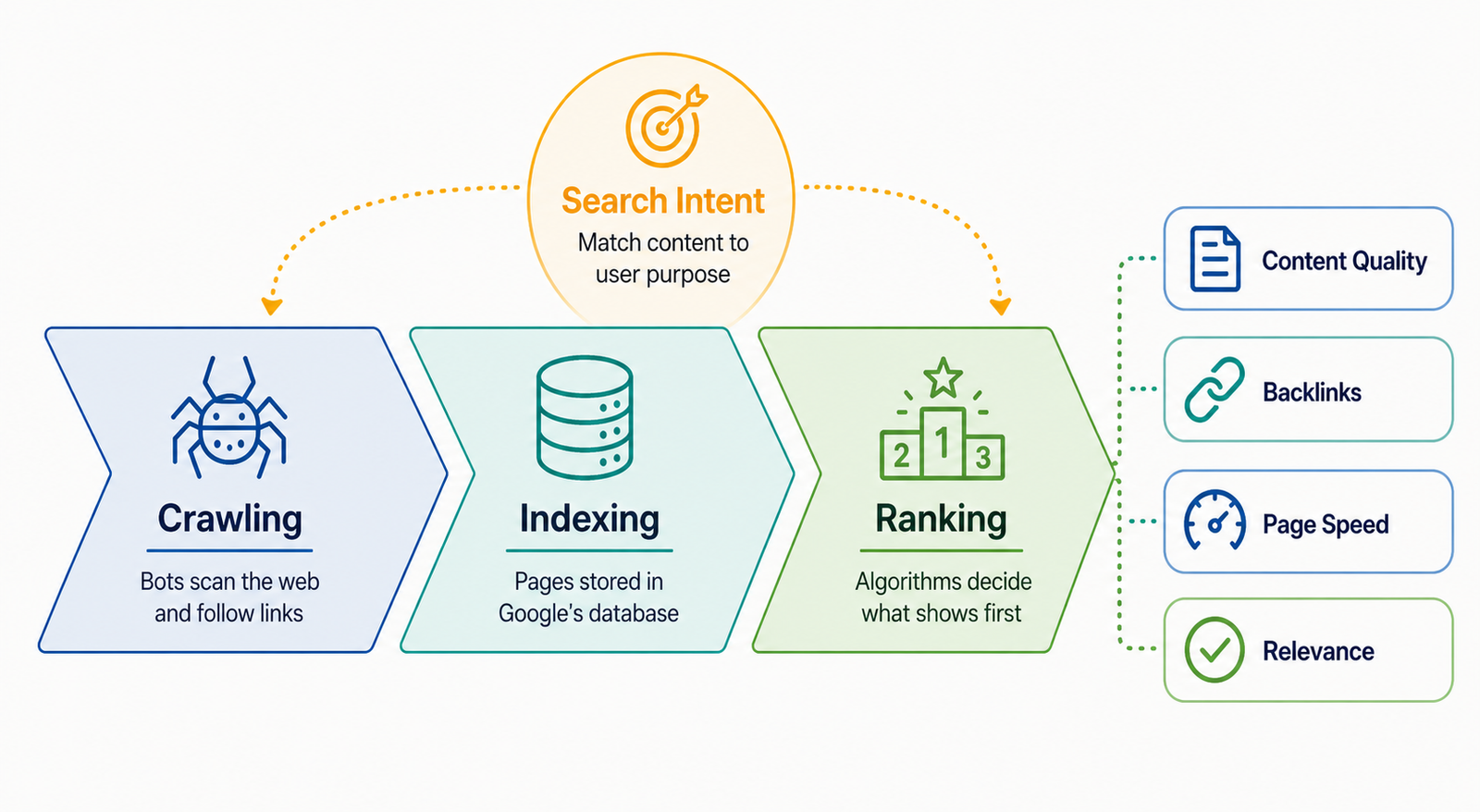
Crawling is when Google sends out bots, sometimes called spiders, to scan the web and follow links from page to page. They’re discovering what exists out there. Once a page is found, Google analyzes its content and adds it to a massive database, which is the indexing step. If your page isn’t indexed, it simply doesn’t exist in search results, full stop.
Ranking is where the competition happens. Once your page is in the index, Google’s algorithm weighs hundreds of signals to decide which pages show up first for any given search query. Content quality, backlinks, page speed, mobile-friendliness, and how well the page matches what the searcher actually wants all factor in.
Google doesn’t publish the full formula, and it updates constantly, but the fundamental goal never changes: give the searcher the most relevant, trustworthy result.
Search intent is one of the most important concepts to internalize here. Every search has a motive behind it. “How to fix a dripping faucet” is someone looking for information. “Emergency plumber Chicago” is someone ready to pay. “Best plumbers near me” is someone comparing options. Your content needs to match not just the words people type but the reason they’re typing them.
The Four Components of SEO
SEO breaks down into four main areas, and understanding the distinction helps you know where to focus your energy.
Technical SEO is the foundation. It covers everything that affects whether search engines can find, crawl, and properly render/read your site. Site speed, mobile responsiveness, HTTPS security, proper URL structures, sitemaps, and fixing broken links all live here. If your technical foundation has problems, the rest of your SEO efforts are compromised before they start.
On-Page SEO is about optimizing the content and structure of individual pages. This includes writing keyword-rich title tags and meta descriptions, organizing content with proper heading tags, placing keywords naturally throughout the copy, optimizing images with descriptive alt text, and building internal links between related pages. It’s the layer where your content actually communicates relevance to search engines.
Off-Page SEO builds authority from outside your own website. Backlinks, which are links from other websites pointing to yours, act like votes of confidence. The more credible and relevant the sites linking to you, the more trust Google extends to your pages. Brand mentions, social signals, and PR coverage also play a role here.
Local SEO is the fourth component and the most actionable for brick-and-mortar businesses or service-area operations. Optimizing your Google Business Profile, getting listed in online directories, maintaining consistent name/address/phone information across the web, and actively collecting customer reviews all contribute to showing up in local search results and Google Maps.
About 80% of U.S. consumers search for local businesses weekly, and reviews are the top trust factor in that decision.
Should You DIY Your SEO or Hire Someone?
The honest answer is that it depends on your situation, your budget, your time, and how competitive your market is. There’s no universal right answer, but there are clear indicators pointing in each direction.
When DIY SEO Makes Sense
If you’re running a local business in a moderately competitive area, starting out with a limited budget, or willing to invest a few hours per week into learning, DIY SEO is a completely reasonable path.
The basics, including keyword research, on-page optimization, content creation, and Google Business Profile management, are all learnable without any technical background.
You know your customers better than any agency ever will. That’s a real advantage when it comes to creating content that actually resonates.
The cost savings are significant too. A $1,500/month agency retainer adds up to $18,000 a year. If that agency isn’t tracking measurable leads or revenue, you could put that money back into your business and spend 20 minutes a day handling the fundamentals yourself.
DIY SEO also forces you to understand your own website and audience. That knowledge pays dividends long after you’ve moved past the basics.
When to Hire a Professional
In my experience, the clearest signal that someone needs professional help is months of genuine effort with nothing to show for it. If you’ve been publishing content, fixing technical issues, and building links consistently for three to six months and your rankings haven’t budged, something in your strategy is off and a fresh set of expert eyes will find it faster than continued trial and error.
Technical SEO audits, complex link-building campaigns, page speed and Core Web Vitals optimization, and ongoing competitor analysis are the areas where professional help genuinely earns its price.
These tasks require advanced tools, real experience, and time most business owners simply don’t have.
If you’re in a highly competitive industry, operating a large website, or trying to rank nationally rather than locally, the level of effort required goes well beyond what a part-time DIY approach can sustain. One bad redirect, a penalty from spammy links, or a robots.txt file that accidentally blocks Google from your entire site can set you back months.
How to Evaluate If Your Current Agency Is Worth It
The most important question to ask about any SEO agency is whether they can directly connect their work to measurable outcomes. Not rankings as a vanity metric, but actual leads, calls, or sales that came through organic search.
Before firing or keeping an agency, you need to know exactly what they’re doing each month. Request a detailed breakdown of deliverables. If their answer is vague, that’s your answer.
A good agency can tell you which pages they optimized, which keywords moved, which links they built, and what the traffic trend looks like over time.
A rough ROI benchmark worth applying: if you’re spending $1,500/month on SEO, you should be generating at least 3x that in attributable revenue from organic traffic. If you can’t confirm that, either the reporting is broken or the results aren’t there. Both are problems worth solving before you sign another month.
The Tools You Need (Most Are Free)
You don’t need an enterprise software suite to get started. The free tools available today are genuinely powerful, and I’ll tell you exactly which ones I use in my own work.
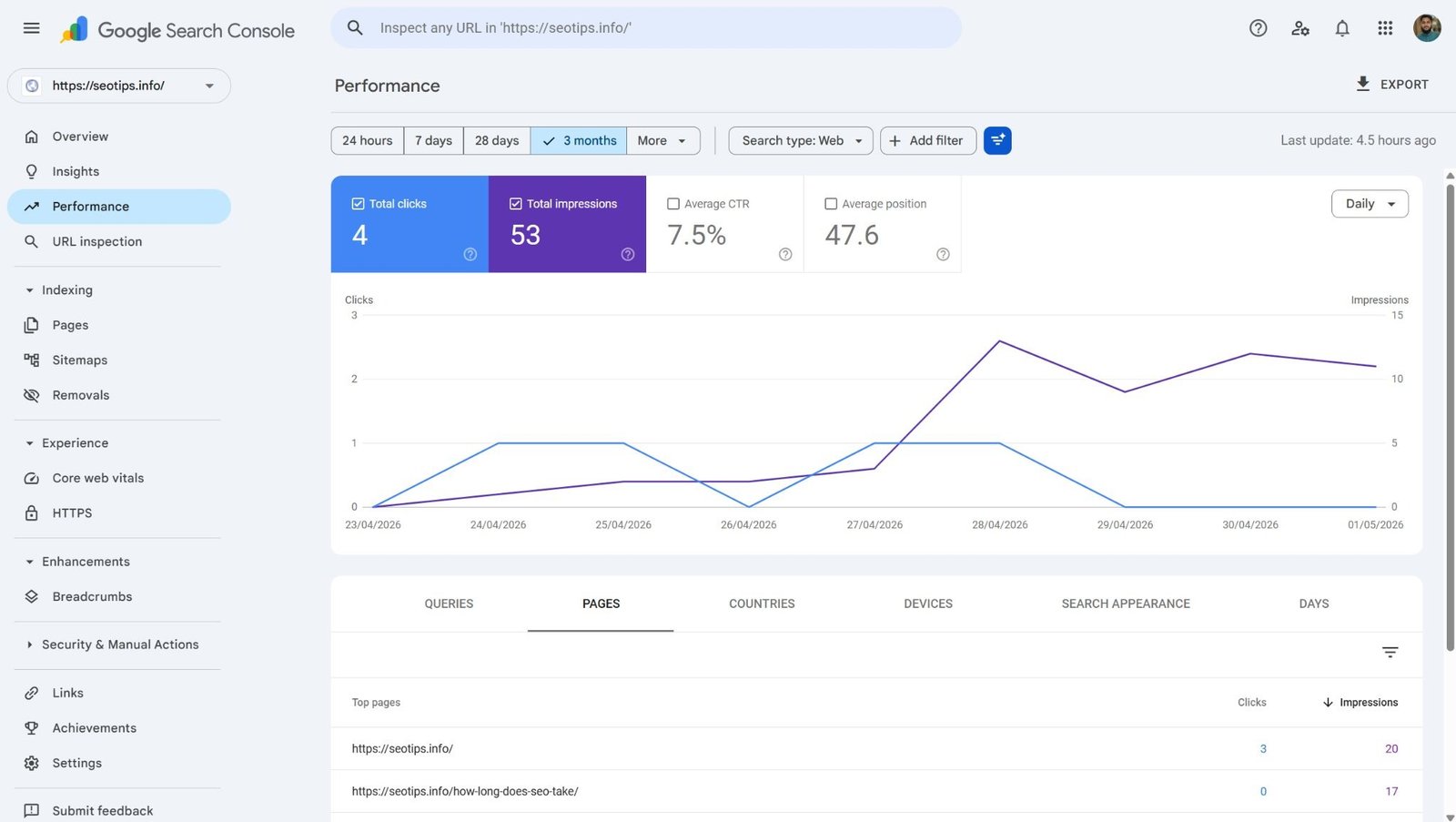
Google Search Console is the single most important tool for any website owner doing their own SEO. It shows you which keywords are bringing people to your site, flags indexing errors, lets you submit pages directly to Google, and alerts you to any security issues. If you do nothing else, set this up.
Google Analytics tracks who’s visiting your site, where they’re coming from, and what they do once they arrive. The organic search channel in your Acquisition report will show you whether your SEO efforts are generating more traffic over time. That data matters for making informed decisions rather than guessing.
Google Business Profile is non-negotiable for local businesses. Google actively promotes its own properties in local search results, so a well-optimized Business Profile showing accurate hours, services, photos, and reviews is one of the highest-leverage things a local business can do. Claim it, complete it, and update it regularly.
For keyword research, I use SEMrush as my primary tool, paired with Google Keyword Planner and Google Trends for validating search volume and spotting trending topics. For technical audits, Screaming Frog is what I reach for first. It crawls your entire site the way Google does and surfaces issues you’d never spot manually.
Two free tools that are criminally underused by beginners are Answer The Public and AlsoAsked. Both tools show you the actual questions people are typing into search engines around any topic, and both offer three free searches per day, which is honestly enough to build a solid content strategy from scratch. If you’re struggling to figure out what to write about, these two tools will solve that problem in about ten minutes.
For on-page auditing, the SEO Meta in 1 Click Chrome extension gives you an instant snapshot of a page’s key SEO elements without opening any external tool. The Ahrefs SEO Toolbar is useful for extracting People Also Ask questions directly from search results. These are small additions to your workflow but genuinely useful ones.
Screaming Frog runs around $200 per year. SEMrush sits at roughly $1,600 per year. You can absolutely get started without either, but once you’re serious about SEO they’re worth the investment.
Step 1: Keyword Research
Keyword research is where every SEO strategy starts. It’s how you find out what your potential customers are actually typing into Google, and it determines which topics and pages you should be building your site around.
Here’s the exact process I follow for new clients, adjusted slightly by niche but consistent in its fundamentals.
Start by brainstorming seed keywords. Ask yourself what your service actually is, then ask how a customer who knows nothing about your industry would search for it. Write down at least four or five seed keywords for each service or product you offer. These are your starting points, not your final targets.
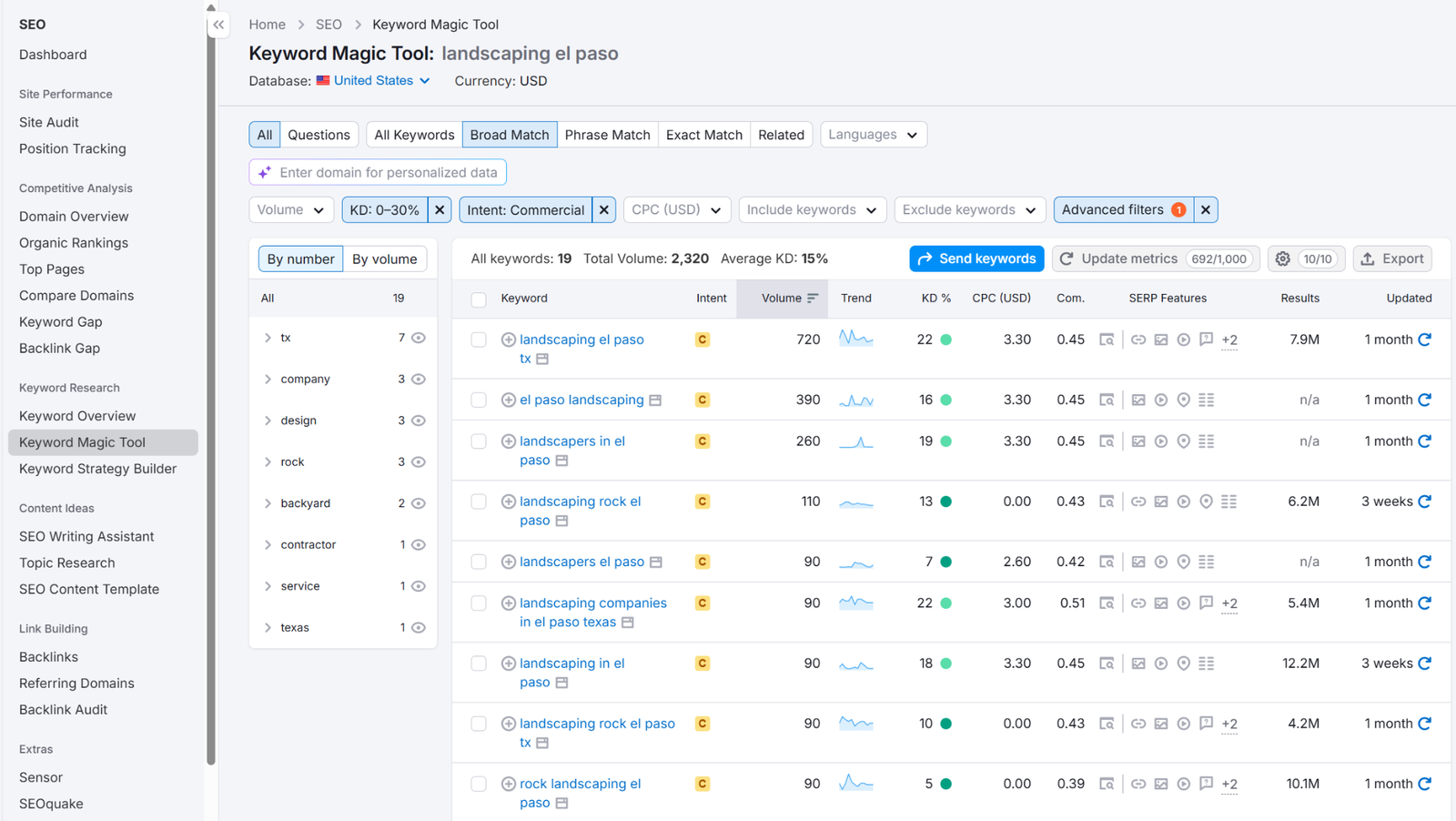
From there, open SEMrush and go to the Keyword Magic Tool. Enter your first seed keyword and apply filters. Set keyword difficulty between 0 and 30. For local businesses, filter by commercial intent and select the local pack SERP feature under the Advanced filters. This surfaces keywords that are already triggering local map results, meaning Google has confirmed these searches have local intent. For content pieces, switch the intent filter to informational. For online stores, transactional intent is your focus.
Build a Google Sheet as you go. For each service, product, or content topic, assign one primary keyword and two to four secondary keywords. Repeat this across your full list of seed keywords and you’ll have a targeted keyword map that drives everything else you create.
If you’re unsure how to structure that, I’ve covered how many SEO keywords a page should target in detail separately.
One mistake I see constantly with newer sites is targeting broad, high-competition keywords right out of the gate. If your site is new with zero authority, you will not rank for “plumber” or “SEO agency.” The sites sitting on page one for those terms have been building trust with Google for years. You cannot outrank them by wanting it more. Start with specific, lower-competition terms, build authority gradually, and expand from there.
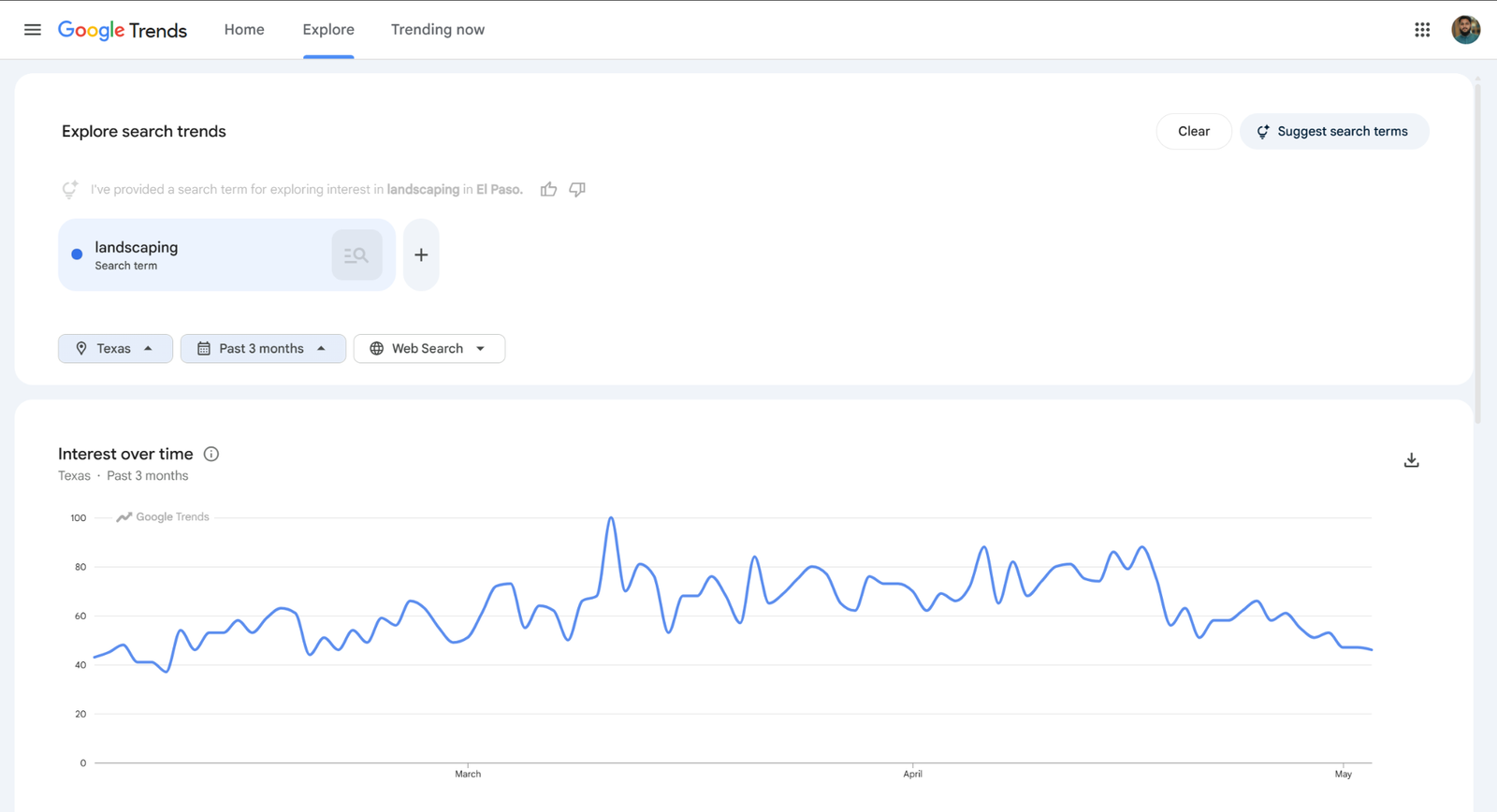
Google Trends is also worth checking regularly. It shows you what topics are gaining search momentum in real time, which is useful for getting ahead of seasonal demand or emerging topics in your niche before the competition catches on.
Step 2: Technical SEO Basics
Technical SEO intimidates people more than it should. For most small business websites, you only need to get a handful of things right, and modern website platforms handle a lot of the heavy lifting automatically.
Site Speed, Mobile-Friendliness, and HTTPS
Start with Google PageSpeed Insights. Type in your URL, hit analyze, and you’ll get a performance score for both desktop and mobile along with a list of specific issues affecting your load time. Compressing your images is the single easiest win here. Large uncompressed image files are one of the most common culprits for slow load times, and free tools like CompressJPEG make this a five-minute fix.
Over 60% of website traffic now comes from mobile devices, so your site needs to work just as well on a phone as it does on a desktop. Most modern website themes are built to be responsive by default, but it’s worth checking the mobile tab in PageSpeed Insights to confirm yours isn’t throwing any usability errors.
HTTPS is the baseline for website security. Look at your URL bar right now. If it starts with “http” without the “s,” your site is flagged as insecure by browsers, and Google uses HTTPS as a ranking signal. Contact your hosting provider and ask about an SSL certificate. Most providers offer them for free.
Crawling Your Site for Hidden Issues
One of the most common problems I find when auditing a new client’s site is technical issues they had no idea existed. Broken links returning 404 errors, redirect chains that slow down crawling, pages accidentally marked as noindex, orphaned pages with no internal links pointing to them. None of these are visible to a casual visitor, but all of them affect how Google perceives and crawls your site.
Use Screaming Frog or SEMrush’s site audit tool to crawl your site and get a full picture of what’s actually out there. Fix 4xx errors first since those are broken pages that waste crawl budget and frustrate users. Clean up redirect chains next. Then check your indexing status in Google Search Console to make sure every page you want ranked is actually being indexed.
This stuff isn’t glamorous, but ignoring it while focusing on content and links is like trying to fill a bucket with holes in it. Get the technical foundation clean first.
Step 3: On-Page Optimization
On-page optimization is about making each page clearly communicate its topic to both users and search engines. Once you’ve done your keyword research, this is where you put it into practice.
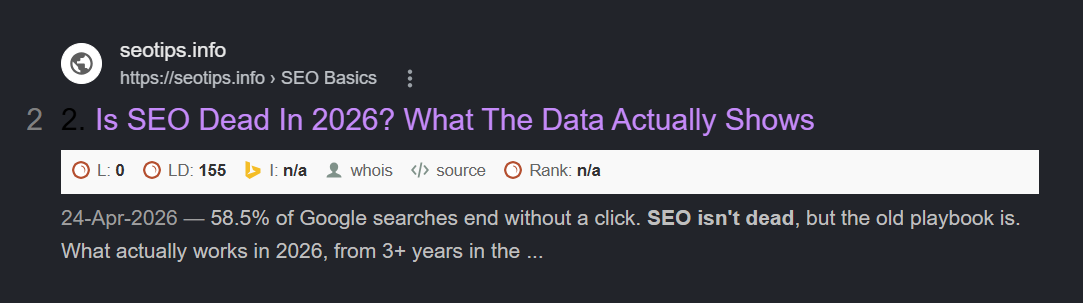
Every page on your site should have a unique title tag under 60-65 characters that includes your primary keyword and is compelling enough to earn a click. The meta description sits below the title in search results and should run under 155-160 characters. It doesn’t directly influence rankings, but it influences whether someone clicks, which matters.
Your H1 heading is the main title of the page, and there should only be one per page. It should include your primary keyword and clearly describe what the page covers. Use H2 headings to organize major sections and H3s only when a subsection is genuinely distinct enough to warrant its own label. Never stuff headings with keywords. Write them for the human reading the page.
Include your target keyword naturally throughout the body copy, in the first paragraph within the first 100 words if possible, and scattered organically through the rest.
Keyword stuffing, which is forcing the same phrase unnaturally and repeatedly, is something Google penalizes not rewards. I see this constantly on sites that haven’t been touched in a while: the same phrase repeated in every other sentence, to the point where it reads like a robot wrote it. Write for the person first.
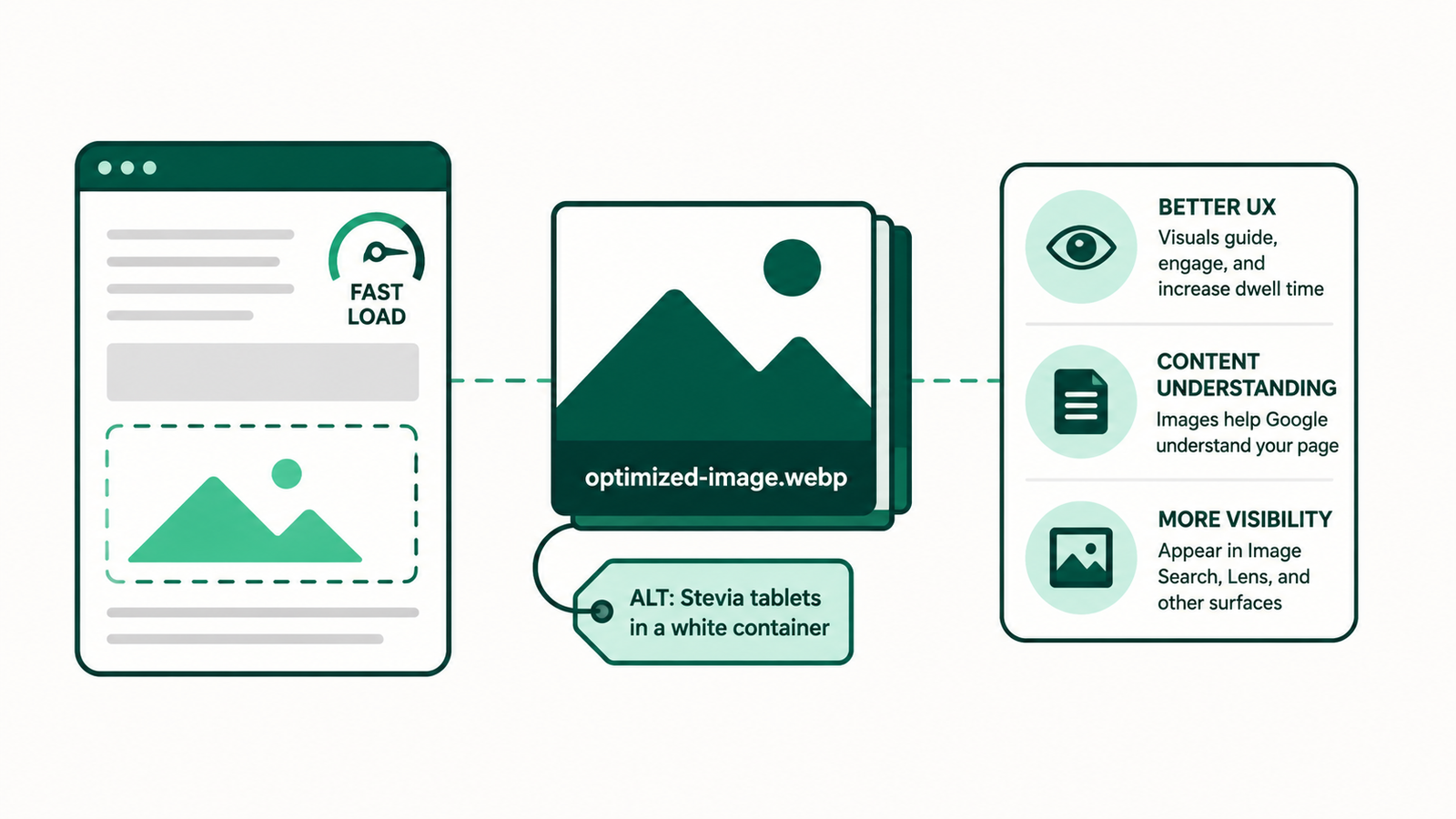
Image optimization is one of the most consistently overlooked on-page tasks. Every image on your site should have a descriptive file name and alt text that describes what’s in the image plainly and specifically. This helps search engines understand your content and makes your site more accessible to people using screen readers.
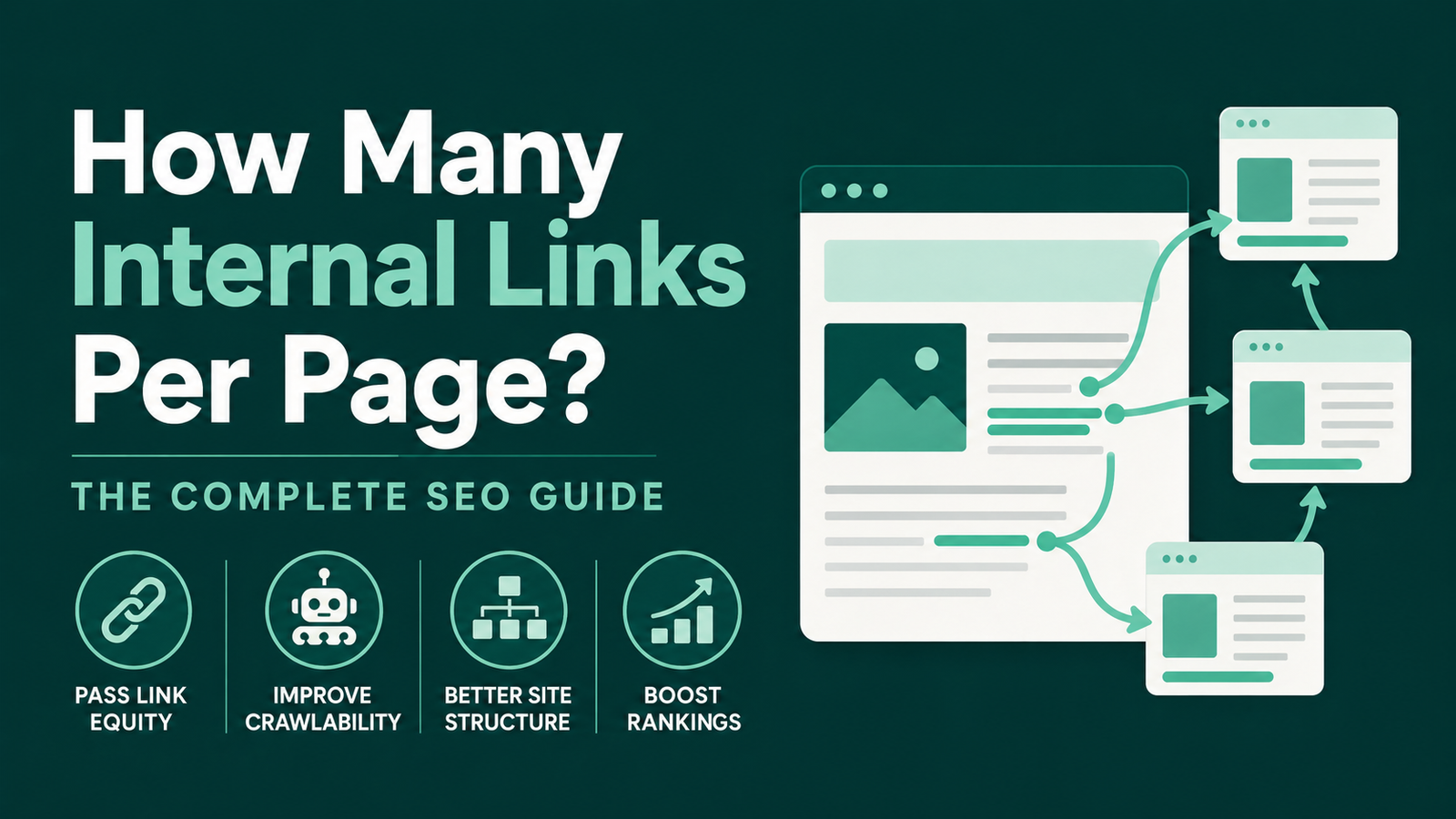
Internal links connect your pages together and help both users and search engines discover related content. Link naturally from one page to another using descriptive anchor text that tells the reader what they’ll find when they click. “See our pricing” is better anchor text than “click here.”
The question most people get wrong is how many to add, so I put together a full breakdown on how many internal links per page actually helps versus hurts.
For local businesses especially, strong internal linking between service pages and location pages can make a meaningful difference in how Google understands your site’s structure.
Step 4: Content Creation
Content is what gives search engines something to rank. A technically clean site with no substantive content won’t rank for anything meaningful.
Good content, in my experience, does a few specific things. It fully addresses what the user came looking for, answers the complete question rather than dancing around it. It’s built on genuine expertise, not surface-level summaries of what everyone else has already written. It’s easy to read, meaning short paragraphs, plain language around a grade five or six reading level, and no impenetrable walls of text. And it has a unique angle, something that makes it different from the ten other articles already ranking for the same keyword.
Zero-expertise content is one of the most common mistakes I see. Business owners or their writers produce articles that technically cover a topic but add nothing new, no real insight, no first-hand experience, no verifiable facts beyond what’s already out there.
Google has gotten increasingly good at identifying this kind of thin content and it simply doesn’t rank the way it used to.
The best content ideas often come from your own customers. Answer The Public and AlsoAsked will show you the questions people are searching around your topic. Your own sales conversations will tell you what people need explained before they buy.
Keep a running note on your phone of questions customers ask you repeatedly. Those questions are content opportunities hiding in plain sight, and they tend to target exactly the kind of specific, lower-competition keywords that newer sites can actually rank for.
When you write, match the content format to the search intent behind your target keyword. A page targeting “emergency roof repair” should lead with how fast you can respond and how to reach you. A page targeting “how to know if your roof needs replacing” should be an informational guide. Same business, completely different content approach.
Updating old content is something most business owners ignore completely. If you published a blog post two years ago that’s sitting on page two or three for a keyword, refreshing it with new information, better structure, and updated facts will often push it into the top results faster than writing something new from scratch.
Step 5: Link Building
Backlinks are one of Google’s most significant ranking signals. A link from another website to yours acts as a vote of confidence, telling Google that someone else found your content credible enough to reference. The quality of that referring site matters enormously. One link from a respected industry publication is worth more than fifty links from irrelevant directories.
Easy Wins for Beginners
For local businesses, the easiest starting point is getting listed in high-quality, niche-specific online directories. Yelp, Yellow Pages, Bing Places, Apple Business Connect, and any industry-relevant directories are all worth claiming. Make sure your Name, Address, and Phone number are identical across every listing. Inconsistencies confuse search engines and hurt local rankings.
Link insertions are another effective tactic I use regularly. The idea is straightforward: find pages that are already ranking well for topics relevant to your business, reach out to the site owner, pitch why a link to your content would add value for their readers, and negotiate placement. It works because you’re targeting pages that already have Google’s trust, so a link from them carries real weight.
Partnership links with nearby businesses, local newspapers, and community organizations are also worth pursuing. These links tend to be highly relevant geographically and topically, which is exactly what local SEO rewards.
What to Avoid
I learned this one the hard way. In 2024, I was running an experimental dropshipping store and decided to test bulk link building to boost traffic quickly. I ordered a link package from Fiverr and within a week had around 6,000 spammy backlinks pointing at the site. The site was essentially dead shortly after. It took me about a week to realize what had happened, and the site never recovered. I moved on rather than attempt a cleanup.
The lesson is straightforward: Google is very good at identifying manipulative link patterns, and a manual penalty can remove your site from search results entirely. Every shortcut in link building carries real downside risk. Don’t buy links in bulk, don’t participate in link schemes, and don’t submit to low-quality directories just to inflate your backlink count. Build links slowly, from relevant sources, through genuine relationships and good content.
Step 6: Local SEO
If your business serves a specific geographic area, local SEO is where you’ll see the fastest and most tangible results from your efforts. The goal is showing up when someone in your area searches for what you offer, whether that’s in the standard search results or in the Google Maps pack that appears at the top of local queries.
Your Google Business Profile is the cornerstone. Claim it if you haven’t, complete every field, upload real photos of your business and team rather than stock images, list your services with descriptions, and keep your hours accurate. Post updates regularly. Google rewards active profiles with more visibility.
For local businesses, make sure your service pages are hyper-local. Don’t just write about “plumbing services.” Write about “plumbing services in [your city]” with content that references local context, local customer needs, and local service areas.
Pair that with strong internal linking between your service pages and any location-specific pages, and you give Google a clear picture of exactly who you serve and where.
Reviews are oxygen for any local business. They signal to Google that your business is active and trustworthy, and they’re the number one trust factor for potential customers deciding between you and a competitor.
The simplest way to generate reviews consistently is to ask directly right after a job well done. A follow-up text with a direct link to your Google review page removes all friction from the process.
NAP consistency, meaning your Name, Address, and Phone number, needs to be identical everywhere your business appears online. Your website, Google Business Profile, Yelp, Facebook, local directories, all of it should match exactly. Even small variations like “St.” versus “Street” can create signals that weaken your local search presence over time.
Step 7: Tracking Your Results
Doing SEO without tracking is like exercising without ever stepping on a scale. You have no way of knowing whether anything is working.
Google Search Console is your first stop. The Performance report shows you which queries are bringing people to your site, which pages they’re landing on, your average position in search results, and your click-through rate. Check this weekly and look for trends. Are impressions growing? Are rankings improving for the keywords you’ve targeted?
Google Analytics shows you what happens after someone arrives on your site. Watch the organic search channel in your Acquisition report. If your SEO is working, organic traffic should trend upward over time. Look at which pages are driving the most organic visits and which ones have high bounce rates, as that’s a signal that the content isn’t matching what searchers expected to find.
A rank tracking tool lets you monitor your position for specific target keywords over time. SEMrush includes rank tracking, and there are standalone tools available at lower price points if you want something simpler.
Measure your effort month over month. Look at what’s working and do more of it. Look at what isn’t moving and ask why before doubling down on the same approach. SEO rewards consistency and iteration more than any single tactic.
Don’t check your rankings daily. SEO results shift gradually and checking too frequently creates anxiety over normal fluctuations. A weekly or bi-weekly check gives you enough data to spot real trends without driving yourself crazy over day-to-day noise.
How Long Does DIY SEO Take to Work?
The most common expectation clients bring to me is that SEO works overnight. It doesn’t, and anyone telling you otherwise is selling something.
“For most small business sites, the first signs of movement appear within four to eight weeks of making solid on-page improvements and getting your Google Business Profile fully set up. Meaningful ranking improvements for competitive keywords typically take three to six months of consistent effort. But no one can tell you exactly how long SEO takes because there is no fixed timeline. National or highly competitive terms can take a year or more.
I had an ecommerce client a while back who started from zero. Within three months of pure SEO work, no paid ads, no link building, just solid technical foundations and well-targeted content, the store was generating around $3,000 in monthly revenue. They left after that saying it was taking too long. I knew based on the trajectory that the results were about to compound significantly, but they didn’t stay to see it.
If your efforts aren’t showing any movement after three months, don’t assume SEO isn’t working. Look at whether you’re targeting the right keywords, whether your content genuinely serves the user’s intent, and whether your technical foundation is clean. More often than not, one of those three things is the bottleneck.
The Real Cost of DIY SEO (Time vs. Money)
DIY SEO is not free. It trades money for time, and your time has real value.
Learning the basics takes a few weekends of focused effort. Ongoing execution, writing content, building links, monitoring performance, updating existing pages, realistically takes several hours per week to do properly. That opportunity cost is real and worth factoring into your decision.
The calculus shifts depending on results. If an agency is delivering genuine ROI in measurable leads and revenue, that monthly retainer is probably a bargain. If they’re sending you PDF reports with keyword rankings and no clear connection to your business growth, you’re paying for activity, not outcomes.
The middle path that many business owners land on is handling the basics themselves, Google Business Profile, content creation, on-page optimization, and outsourcing the technical and link-building work to someone who can do it faster and better. That’s a reasonable approach that keeps costs down without requiring you to become a full-time SEO practitioner.
Whatever you decide, start somewhere. The worst outcome is spending another six months paying for something you don’t understand or doing nothing at all while competitors take the rankings you could have had.