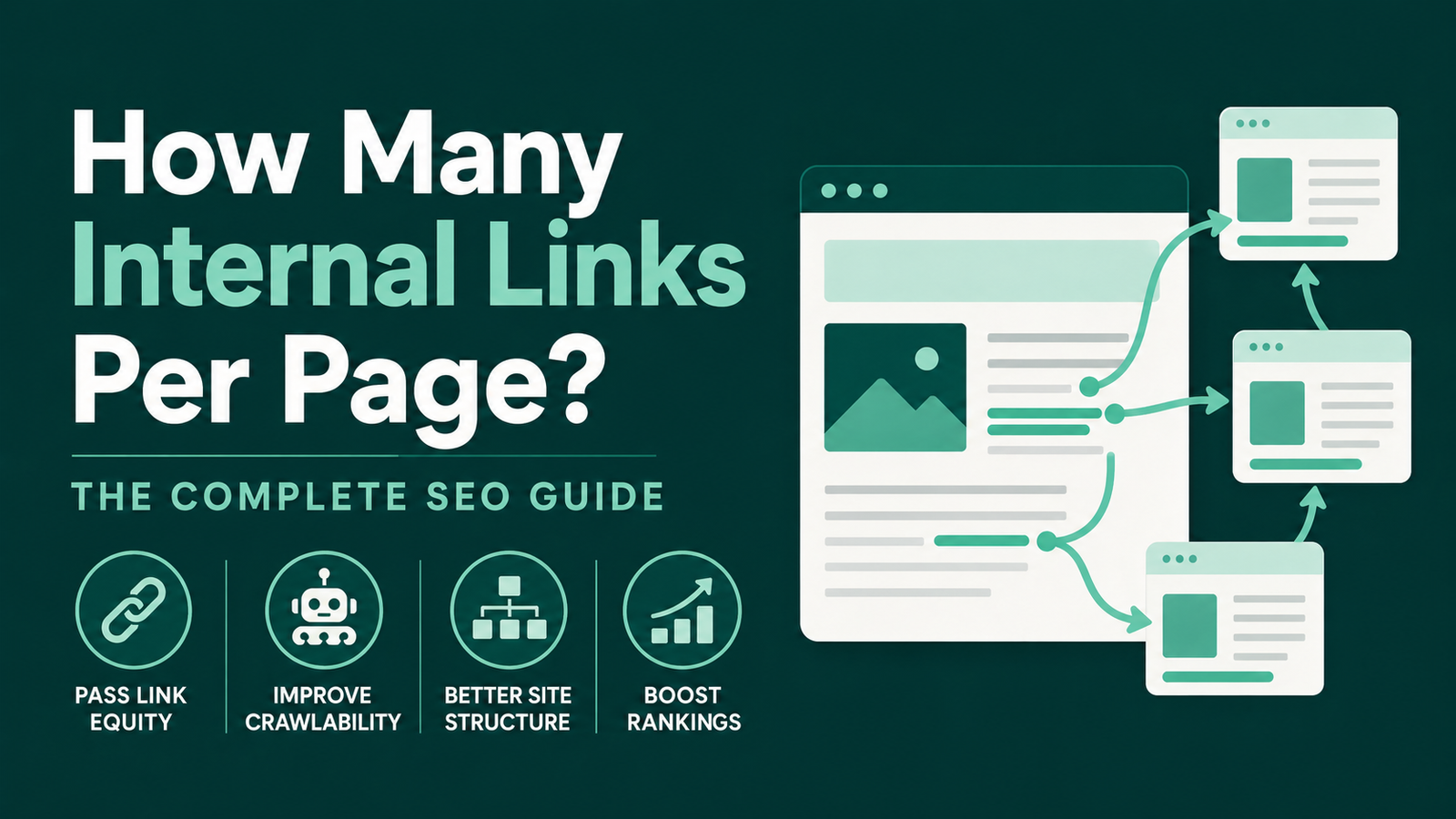
- Internal links distribute authority between pages, improve crawlability, and signal topical relevance to Google
- Aim for 2 to 5 internal links per 1,000 words and keep total page links under 150
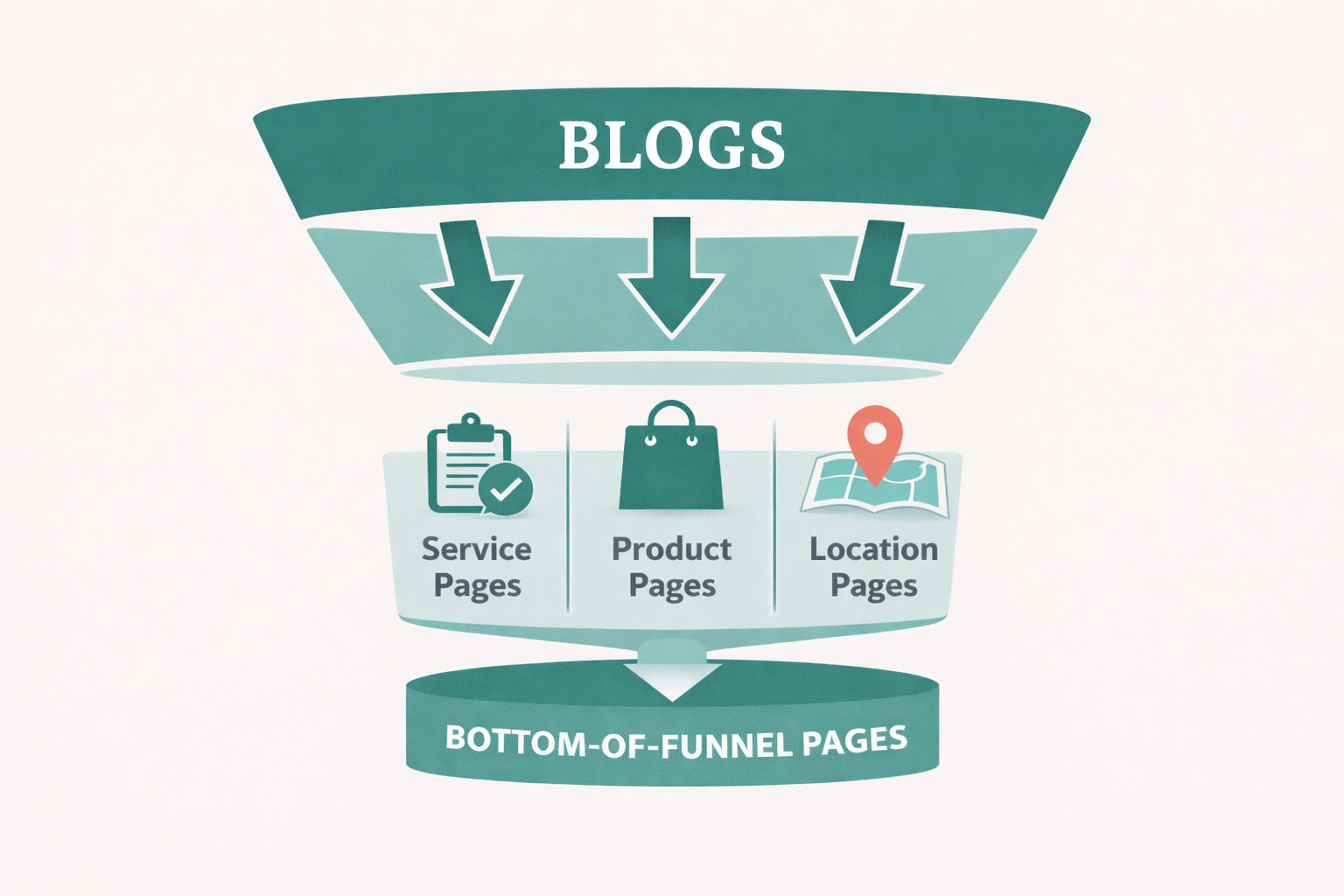
- Always link top of funnel to bottom of funnel, blogs to service pages, product pages, and location pages
- Use Screaming Frog to audit, look for broken links, orphan pages, redirect chains, and over-optimized anchors
- Reaudit every 4 to 6 weeks and update internal links as pages climb in rankings
- New sites should keep it to 2 to 3 links per page until authority starts building
Most SEO guides obsess over backlinks and ignore the one ranking lever you have complete control over. Internal links are yours to place, adjust, and optimize whenever you want, with no outreach, no negotiation, and no budget required.
I had a pest control client in Hamburg whose organic traffic jumped from 300 to nearly 1,400 monthly visitors in about 3 to 4 weeks, purely from interlinking their service pages strategically.
No new backlinks. No content overhaul. Just a deliberate internal linking structure.
This guide covers everything from what internal links actually do, how I personally audit and build internal linking strategies, so you can apply the same thinking to your own site.
What Are Internal Links and Why Do They Matter?
Internal Links vs External Links
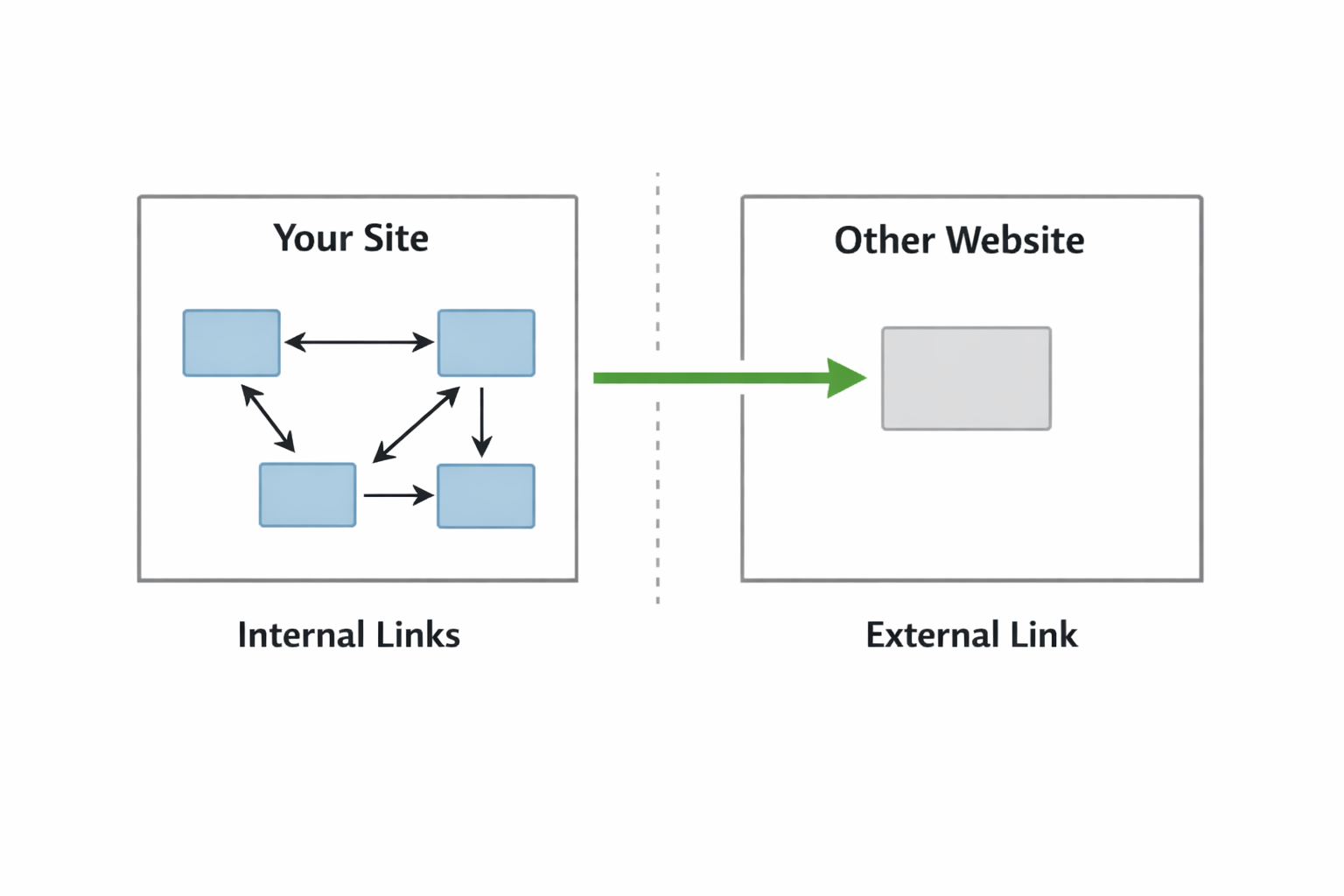
An internal link is a hyperlink that connects one page of your website to another page on the same domain. External links point to pages to a different domain entirely. The distinction matters because each type serves a different purpose in SEO. External backlinks build your site’s overall authority while internal links distribute that authority across your pages and signal to Google which ones deserve the most attention.
How Internal Links Pass Link Equity (PageRank)
Google developed PageRank in 1997 to evaluate the quality and quantity of links pointing to a given page or domain. The more authoritative links a page receives, the stronger it appears to Google.
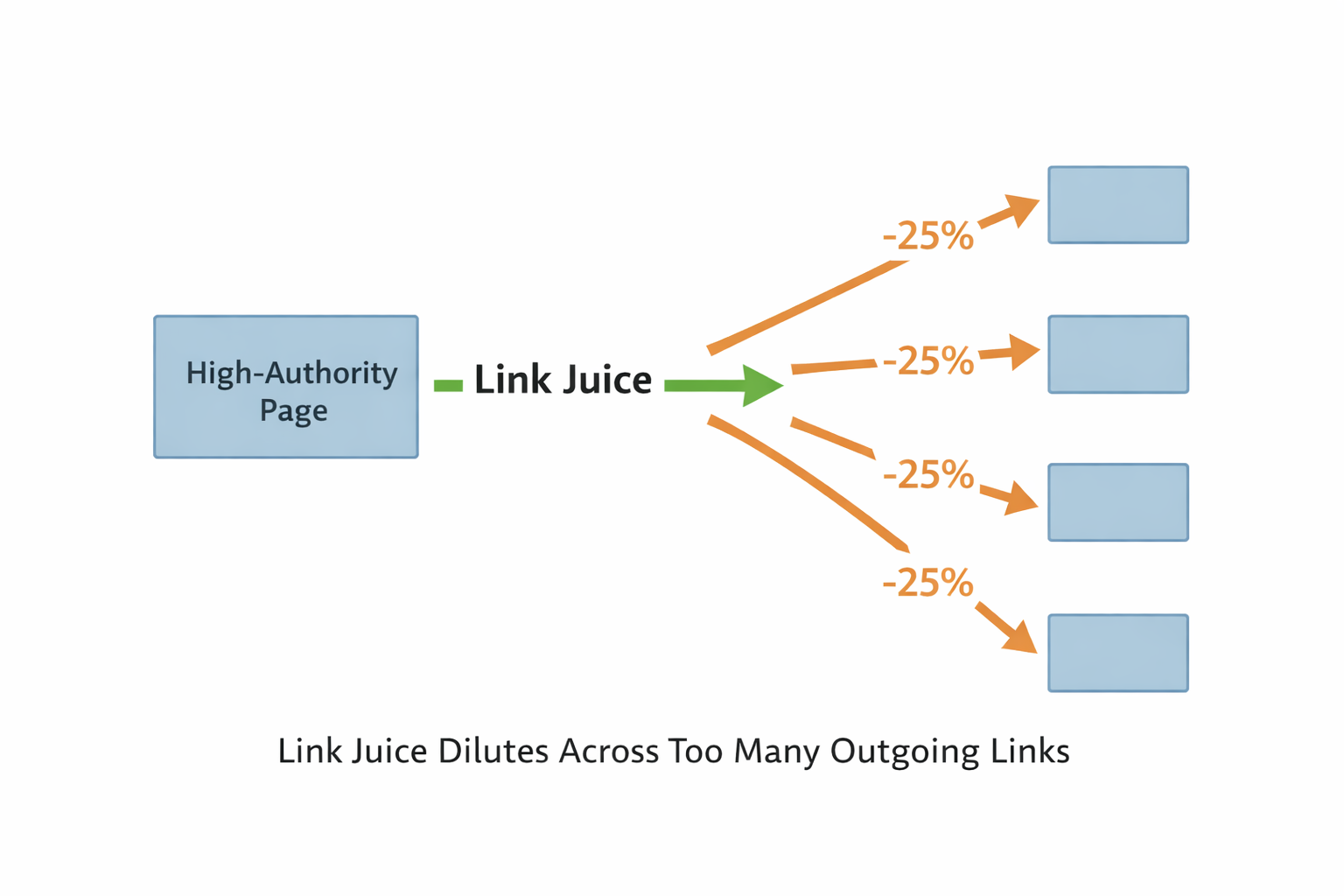
The same principle applies internally. When a high-authority page on your site links to another page, it passes some of its ranking power along, commonly called link juice or link equity.
What most people miss is that this flow gets diluted when too many outgoing links exist on a single page. Every additional link you add reduces the equity each individual link passes, which is why both placement and quantity matter.
The Impact of Internal Links on Crawl Budget
Beyond authority distribution, internal links directly affect how efficiently Google crawls your site. Google allocates a specific amount of time and resources to crawl each website, and that budget is not unlimited. Overloading pages with links to low-priority content wastes that budget on pages that provide little SEO value.
SEO consultant David Quaid explains this in more mechanical terms in this podcast. He says “when Google reads your sitemap, the bot that processes it does not crawl those URLs directly. It places them into crawl pools triaged by authority level. Pages with little or no authority go into a diluted pool where more pages are assigned per bot, meaning they get crawled less frequently. Higher authority pages get their own faster crawl cycle. This happens at the individual page level, not the site level, which means building internal link equity to your most important pages directly affects how quickly Google processes them.”
Internal links also help Google discover new pages on your site, which is a benefit that gets overlooked because it is less glamorous than ranking jumps.
Even if a page never earns a single click, having internal links pointing to it ensures crawlers can find it and index it. Discovery and crawling are reason enough to link to a page, independent of whether it is driving traffic yet.
How Many Internal Links Per Page?
The honest answer is that it depends, but that does not mean you should guess. A reasonable starting point is 2 to 5 internal links per 1,000 words of content. For a 1,500-word blog post, that puts you somewhere between 3 and 8 links, which aligns with what most practitioners report working well.
Neil Patel has suggested 2 to 4 links for posts of 1,500 words or more. Other SEOs land closer to 5 to 7 for longer content. The variance exists because content type, site structure, and the relevance of available pages all affect what feels natural and useful to the reader.
While there is no perfect number for contextual links within your content, there is a ceiling for total links on a page. Google has previously stated that more than 100 internal links on a single page is excessive, though that guidance dates back to early algorithm constraints.
Modern SEO leaders like Moz suggest that important pages can sometimes carry 200 to 250 follow links without issue. A practical, safe ceiling is 150 total links per page. This includes navigational links, footer links, sidebar links, and every contextual link in your content. They all count toward the total.
What the Data Says: The Zyppy Study
Zyppy SEO analyzed over 23 million internal links and found a clear pattern. Pages with 40 to 44 internal links pointing to them saw the most significant boost in organic traffic. Beyond that threshold, the effect reversed.
Pages receiving more than 50 internal links began to see diminishing returns, with some showing lower performance. Google assigns value to each link, and when too many links point to a single page, the authority of each individual link gets divided into smaller portions.
This data gives you a useful target range when deciding how aggressively to link toward your most important pages.
Why There Is No Universal Magic Number
Content length is one variable, but site structure and page purpose matter just as much. A 500-word page crammed with 40 links will feel spammy and confuse both users and crawlers. A 5,000-word pillar guide with the same number of links reads naturally.
An ecommerce category page legitimately needs more links than a short blog post because it connects to dozens of product pages by design. The right number is always the number that serves the reader without diluting the authority you are trying to distribute.
For new sites specifically, I keep internal links to 2 or 3 per page initially and gradually increase that number as the site starts ranking. A brand new site has no authority yet, and with no authority flowing through the pages and no clicks coming in, a dense internal link structure does not help your other pages rank.
It spreads nothing across more pages. Link to 2 or 3 pages for discovery and crawling purposes, then build from there as authority accumulates.
Types of Internal Links
Contextual Links
Contextual links sit inside the body copy of a page and connect related articles or topics. These carry the most SEO value of any internal link type because Google treats them as editorial signals. A link placed in the main body of an article, surrounded by relevant text, tells Google that the connection between the two pages is meaningful. The anchor text and surrounding content both contribute to how the target page is understood and ranked.
Navigational Links
Navigational links appear in the main menu, footer, and sidebar and help users move between major sections of a site. They are site-wide, which means they appear on every page and collectively pass a significant amount of internal link equity to wherever they point.
This is why homepage and top-level category pages tend to accumulate authority quickly. Footer and sidebar links follow the same principle but carry considerably less weight than menu links because they sit further down the page and are treated as less editorial by Google.
Navigational links define the primary hierarchy of your site but should not be your main strategy for distributing equity to important content pages.
Image Links
When an image links to another page, the alt text functions as the anchor text. An image link with an empty alt attribute passes no descriptive signal to Google about the target page. Filling in alt text for every linked image is a small fix with a real SEO benefit that most site owners overlook entirely.
Nofollow vs Dofollow Internal Links
Dofollow links pass PageRank to the linked page. Nofollow links do not. When nofollow tags first appeared, some SEOs used them strategically on internal links to concentrate link equity toward specific pages. Google later changed how it handled this and the tactic stopped working.
Today, nofollow internal links essentially waste the equity that would otherwise flow through them. A thorough internal link audit should flag any nofollow tags on internal links and remove them unless there is a specific reason, like blocking user-generated content in comment sections.
Site Architecture and Internal Linking
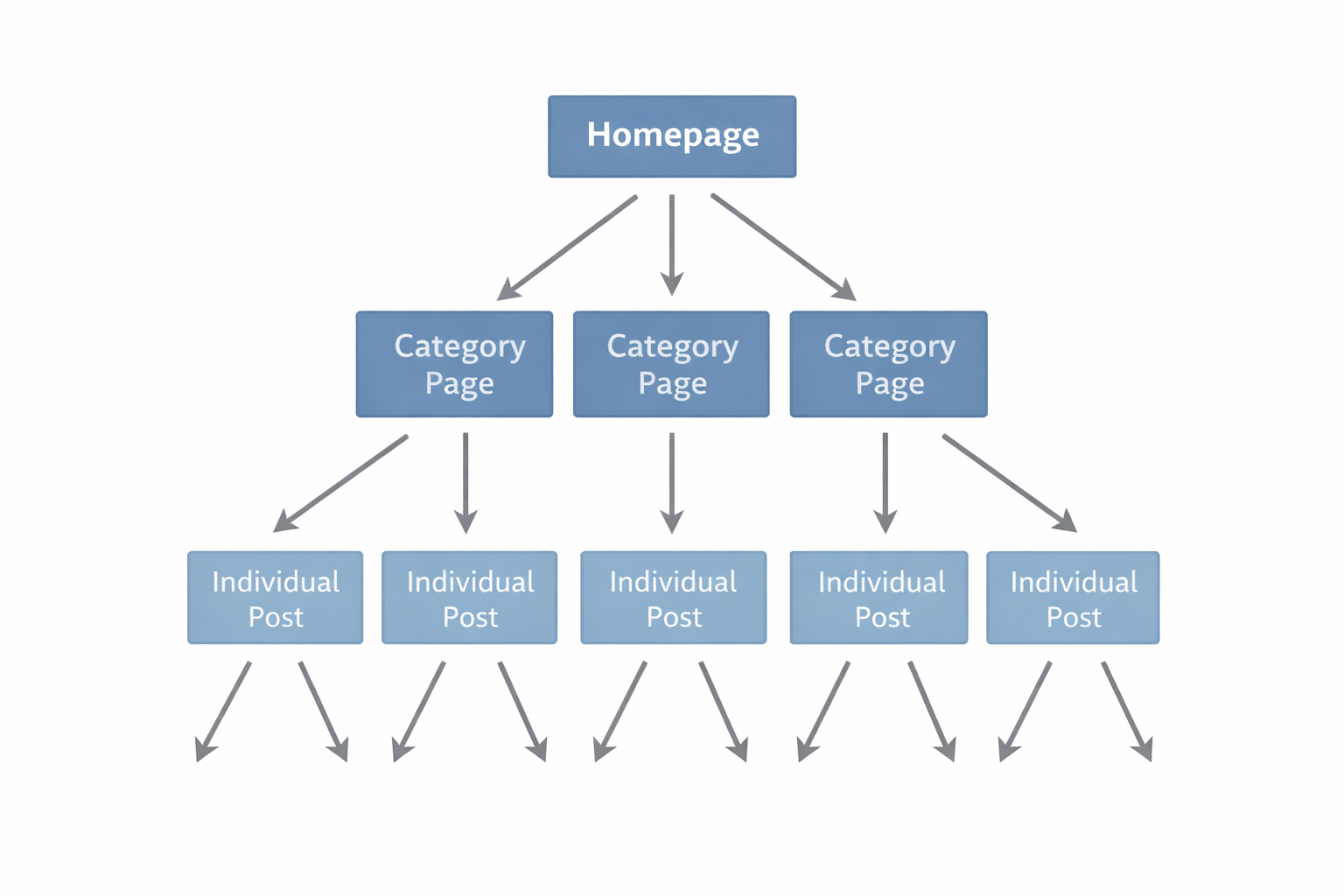
Site architecture and internal linking are inseparable. A shallow structure, where key pages are accessible from the homepage with minimal clicks, allows link equity to flow efficiently throughout the site. A deep structure buries important pages under layers of subcategories, and the authority passed to those pages decreases with every additional level.
The closer a page sits to the homepage in your link hierarchy, the more equity it receives and the better it tends to rank.
The pyramid model places the homepage at the top, category or pillar pages in the middle, and individual posts or product pages at the bottom. Link equity flows downward from the homepage through each layer.
This structure gives your most important pages the most links and prevents your least important pages from absorbing authority that could be better used elsewhere.
How Link Depth Affects SEO Traffic
Pages at depth of 1 to 3 clicks from the homepage generate approximately 9 times more SEO traffic than pages buried at depth 4 or beyond, according to research by My Rankings Metrics. Every important page on your site should be reachable within three clicks of the homepage.
If you have valuable content requiring four or five clicks to reach, adding internal links from higher-level pages to bring that content closer to the surface is likely to improve its rankings noticeably. This is one of the fastest structural fixes you can make on an established site without touching the content itself.
Orphan Pages and How to Fix Them
An orphan page is a page that no other page on the site links to. Search engines can still find orphan pages through XML sitemaps, but users cannot reach them through normal navigation and they receive no internal link equity whatsoever.
Because they sit outside of the link flow, orphan pages tend to rank poorly and often go unnoticed for months. The fix is straightforward: identify them through a site audit tool and add at least one relevant internal link pointing to each from a related page.
It is worth noting that already discovered and indexed pages can sometimes hold their rankings without internal links in certain situations, particularly on established sites with existing authority. But for most sites, and especially newer ones, leaving pages without internal links is a risk that rarely pays off. The exception is pages intentionally kept separate, like pay-per-click landing pages blocked from indexing by design.
How to Build an Internal Linking Strategy
Identify Your Pillar Pages and Hub Pages
A pillar page covers a broad topic comprehensively and serves as the authoritative resource for that subject on your site. Hub pages do something similar, targeting broad keywords with high search volume rather than specific long-tail terms.
These are the pages you want Google to associate most strongly with your core topics. I always start an internal linking strategy by listing every pillar or hub page on the site before touching anything else, because these pages should receive the most internal links from the rest of your content and everything else flows from that decision.
Build Topic Clusters Around Your Pillars
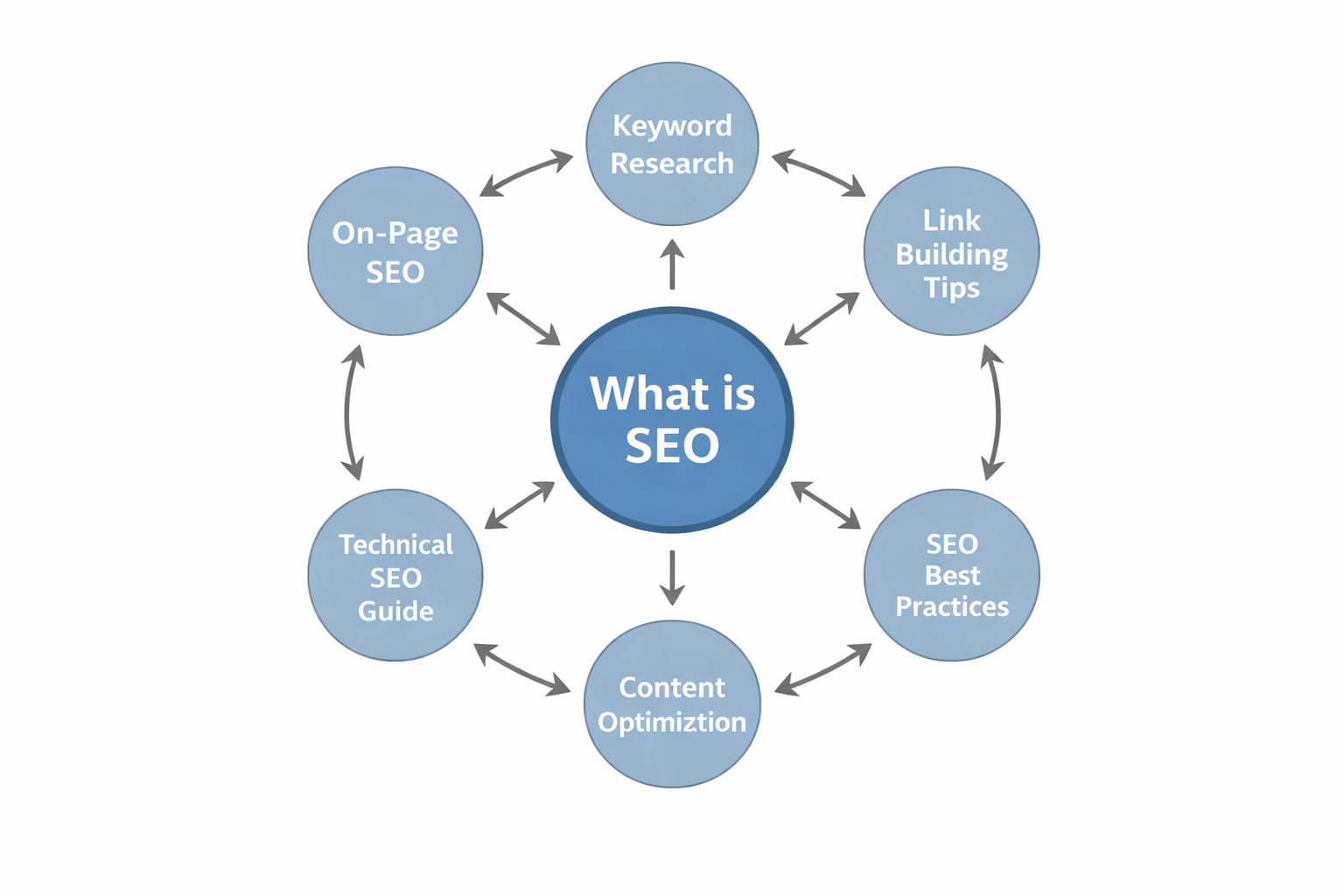
Topic clusters organize supporting content around a central pillar page. Each supporting page covers a subtopic related to the pillar and links back to it, reinforcing the pillar’s topical authority.
For a SEO blog, the pillar might be “What is SEO” with cluster pages covering “On-Page SEO” and “Technical SEO Guide.” Every cluster page links to the pillar, and the pillar links out to each cluster. Related cluster pages can also link to each other when the connection is genuinely relevant, which keeps authority circulating efficiently across the whole topic section.
This bidirectional linking tells Google that the pillar is the most comprehensive and authoritative resource on the topic.
Point High-Authority Pages to Low-Hanging-Fruit Pages
My personal approach is to link from top-performing pages toward pages sitting in positions 10 to 20. If a page is ranking in the top 5 or 3, I look for related pages stuck between positions 10 and 20 and add internal links from the strong page to the weaker ones. This distributes authority to pages that already have some traction but need a push to break onto the first page.
A page ranking in the top 5 but getting no clicks provides no real authority value to pass to other pages. Traffic and engagement are what generate actual page-level authority, and without clicks, that authority simply does not exist yet.
That said, linking from a no-click page is not completely pointless. It still helps Google discover and crawl the pages you are pointing it toward, which matters for newer content that needs to be found and indexed. Just do not expect it to move rankings the way a link from a page that is actively generating traffic would.
As pages start climbing in rankings, I revisit those internal links and update them to point toward the next batch of pages sitting in positions 10 to 20. The authority keeps moving forward through the site rather than concentrating on pages that have already arrived.
The Striking Distance Hack
One of the most actionable internal linking tactics requires no new content. Open Google Search Console and go to the Pages tab. Filter by the last 7 days rather than the last 90 days, because a longer window introduces too many peaks and shifts the average position data in a way that obscures which pages are genuinely close to moving.
Then filter to show pages ranking above position 7.
These are your striking distance pages, close enough to the first page that a targeted internal link from a relevant high-authority page could push them over within days. Point your strongest internal links at these pages using descriptive anchor text and monitor the movement week over week.
Channel High-Traffic Pages Toward Conversion Pages
For ecommerce and service sites, the most valuable internal linking move is connecting top-of-funnel content to bottom-of-funnel pages. Blogs to product pages, blogs to collection pages, blogs to service pages, blogs to location pages. That is the direction you want authority and traffic flowing.
Linking from product or service pages back up to blog posts dilutes the commercial intent of your most valuable pages, so I avoid it unless the connection is highly relevant and genuinely useful to the reader. Top-of-funnel to bottom-of-funnel is the default direction. Bottom to top is the exception.
Internal Linking Best Practices
Writing Effective Anchor Text
Anchor text should describe the context of the page it links to, clearly and specifically. “Click here” tells nothing about the destination however “How to fix broken internal links” tells exactly what to expect. Using keyword-relevant anchor text on internal links is one of the most direct signals you can send about what a page should rank for, and it costs nothing beyond a few seconds of thought when placing the link.
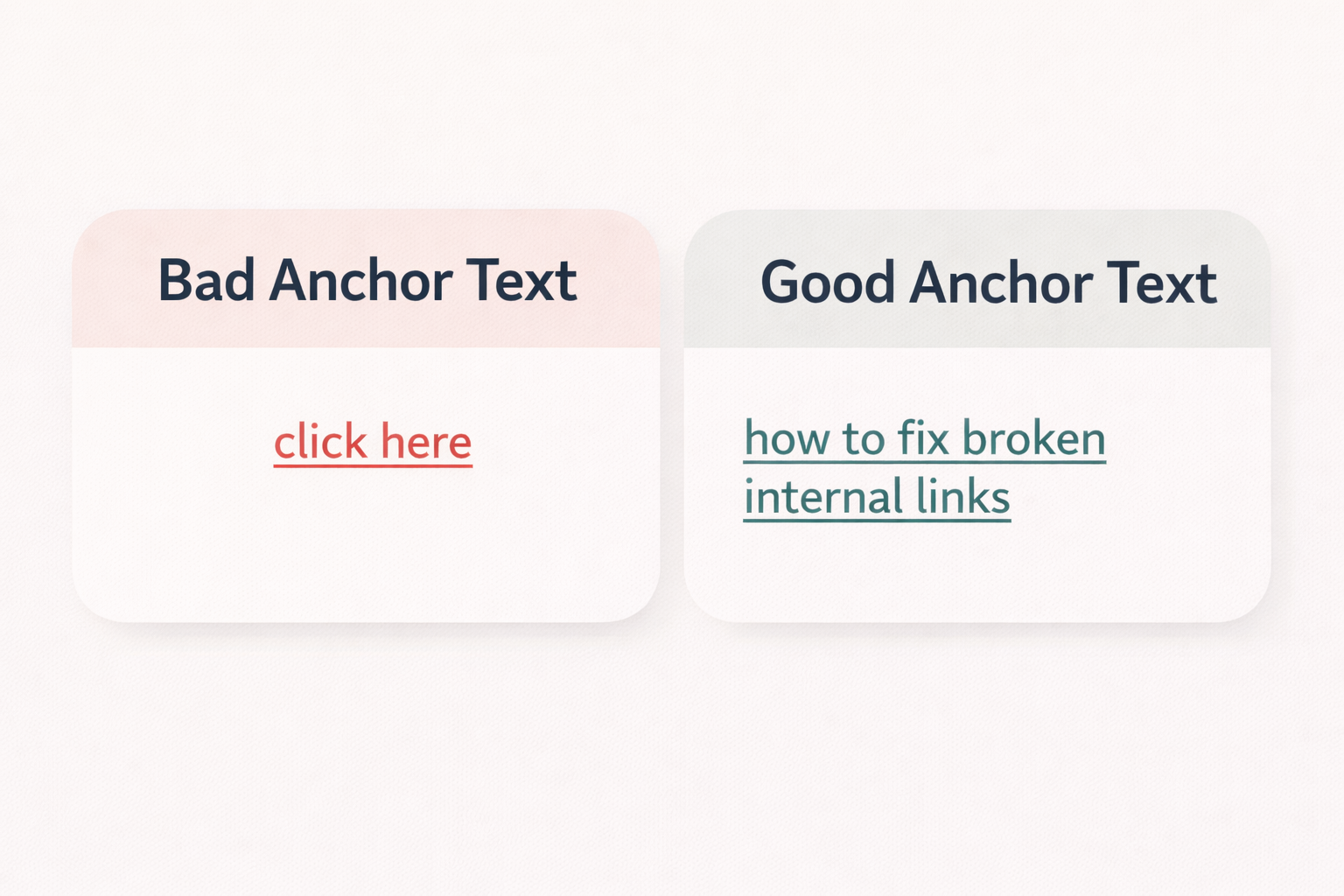
The most common anchor text mistake I see is over-optimizing for exact match anchors. When every internal link pointing to a page uses the exact same anchor text, it looks unnatural and can work against you.
Diversify your anchors. Use the primary keyword sometimes, a close variation other times, and a natural descriptive phrase when that fits better. This ties directly into your broader keyword strategy per page, where signal relevance matters more than repetition. The goal is to signal relevance without triggering over-optimization flags.
Placing Links in the Main Body Content
Links placed within the main body of a page carry more weight than links in headers, footers, or sidebars. Google treats contextual links as editorial decisions, meaning the site is actively recommending the linked page as relevant and useful.
Placing your most important internal links within the first few paragraphs of a page passes more equity than placing them at the bottom, and readers are more likely to click them while they are still engaged with the content.
Keeping Site Structure Within Three Clicks
Every page that matters to your SEO should be reachable from the homepage in three clicks or fewer. Auditing click depth is one of the first things I do when reviewing a new site, because pages sitting four or five levels deep rarely rank competitively even with strong content. They receive so little internal link equity by the time it trickles down to them that the content quality alone cannot compensate.
Adding links from higher-level pages to deep content is often the fastest way to improve rankings across a large site without writing a single new word.
Optimizing Image Link Alt Text
Every linked image on your site is an opportunity to send a topical signal to Google through its alt text. An image linking to a category page without alt text is a wasted signal. A brief, descriptive alt attribute that reflects the content of the destination page costs nothing to add and contributes meaningfully to how Google interprets the link. Run a site audit specifically for empty alt text on linked images and treat filling them in as a quick win alongside your other audit fixes.
Common Internal Linking Mistakes to Avoid
Over-Optimization and Link Stuffing
Adding as many internal links as possible does not improve SEO. When a page is stuffed with links, the ranking power of each individual link shrinks and the overall effect becomes counterproductive.
Over-linked pages also frustrate readers and increase bounce rates, which compounds the SEO damage. Quality and relevance matter far more than volume, and that principle holds regardless of how competitive your niche is.
Think of every internal link as an investment. Every link you place has a cost because it dilutes the equity on that page. A page with 50 links spread across it is poorly invested, the same way a business that writes checks before its invoices land is going to run into trouble.
If you have pages linking to a destination that cannot rank, you are better off redirecting those links somewhere they can actually generate a return.
I saw this principle play out in the most chaotic way possible when reviewing a single-product ecommerce site during an initial consultation. Every blog post had 5 to 6 internal links, all pointing to the same product page, all with different random anchor text. The site was sending Google a flood of contradictory signals about one page while doing nothing useful for the rest of the site.
If I had taken that client on, the fix would have been to strip out all those internal links, rebuild the anchor text strategy with intention, redistribute links from blogs to other blogs and to the homepage, and keep it to one link per blog post pointing to the product page with a relevant, consistent anchor.
Vague or Generic Anchor Text
Generic anchor text is one of the most common and costly internal linking mistakes, and it often flies under the radar because it does not trigger any obvious errors in an audit. Phrases like “learn more,” “read this,” or “click here” pass no useful information to Google and users about what the linked page covers.
Every anchor text is a free relevance signal, and leaving it generic is the equivalent of leaving money on the table. Replacing generic anchors with descriptive ones is one of the highest-leverage improvements you can make during a link audit because the pages you are trying to rank already exist and just need clearer signals pointing at them.
Broken Internal Links and Redirect Chains
A broken internal link leads to a page that no longer exists, returning a 404 error to both users and crawlers. Every broken link wastes crawl budget and creates a dead end for link equity that would otherwise continue flowing through the site.
Redirect chains compound the problem by passing diminished equity through multiple hops before reaching the final destination.
Regular audits using Screaming Frog catch both issues before they accumulate into a meaningful ranking problem.
Linking Irrelevant Pages Together
This is the internal linking mistake that causes the most quiet, unnoticed damage over time. Linking two unrelated pages together does not help either one rank. Google uses the surrounding content and anchor text of a link to understand its context, and a link that does not fit the topical context of the source page sends a confusing signal that adds noise to your site’s semantic structure.
Only link to pages that are genuinely relevant to what the reader is currently reading. If the connection feels forced, it probably is, and Google is likely reading it the same way.
Ignoring Mobile Users
Google indexes and ranks based on the mobile version of your site. Internal links that are too small to tap, too close together, or hidden inside collapsed menus on mobile are effectively invisible to a large portion of your audience.
Navigation menus should not bury important links on smaller screens, and contextual links within content should be spaced and formatted clearly for touch interaction. A link that works perfectly on desktop but disappears into a cramped mobile layout is not functioning as an internal link for the majority of your visitors.
How to Audit Your Internal Links
I use Screaming Frog for internal link audit. It crawls your entire site and gives you a complete picture of your link structure in one export. For sites where I also need to check authority data alongside crawl data, Ahrefs or SEMrush Site Audit fills that gap.
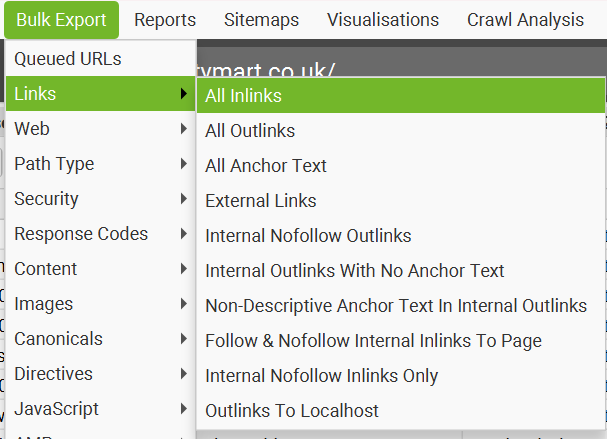
My audit process starts in Screaming Frog. Go to bulk export, then links, then all inlinks.
Open the spreadsheet and review the source URL, destination URL, anchor text, and status code for every link.
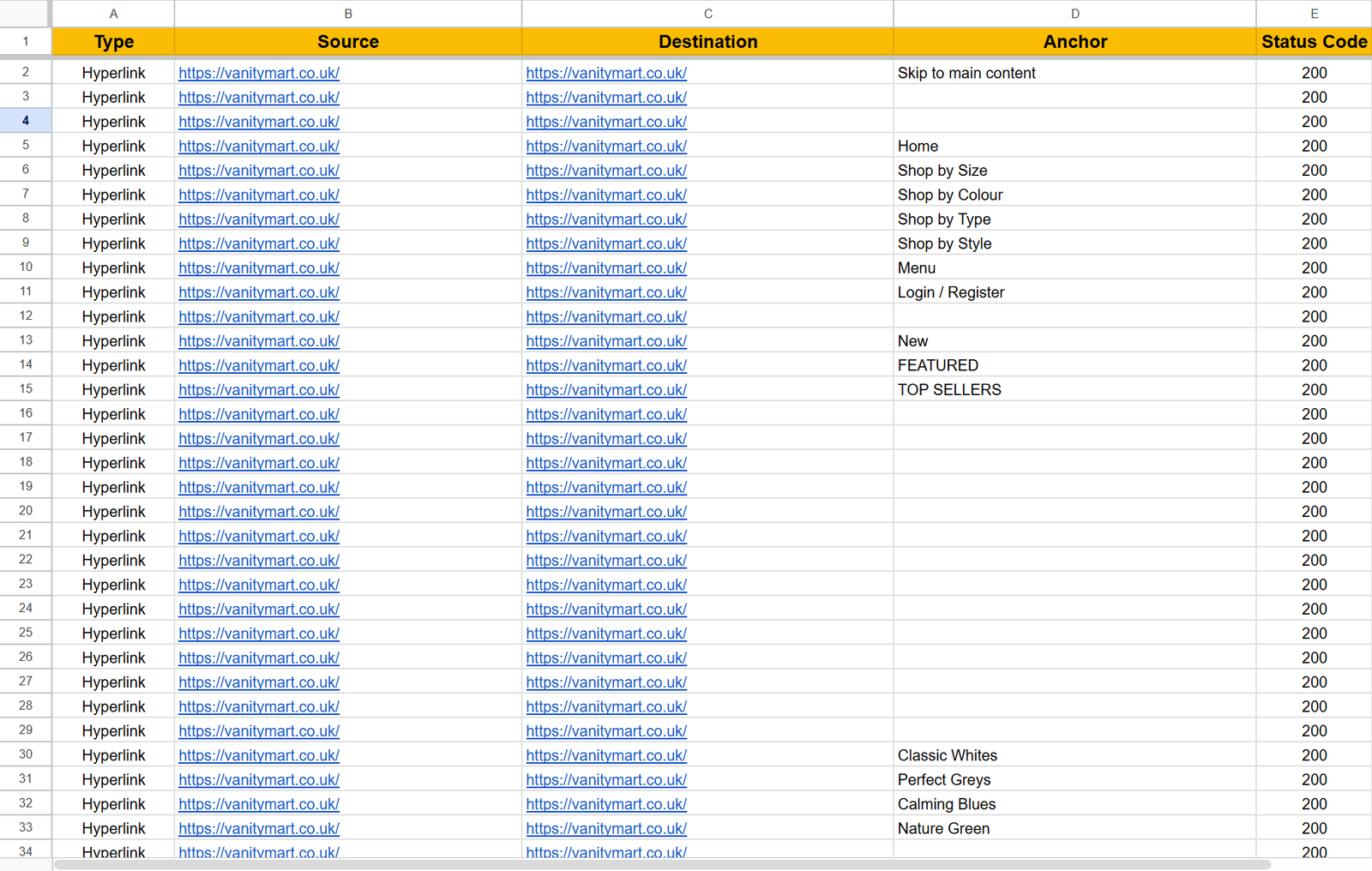
Look for broken links and 404 errors, over-optimized anchors where the same exact keyword phrase appears too many times pointing to the same page.
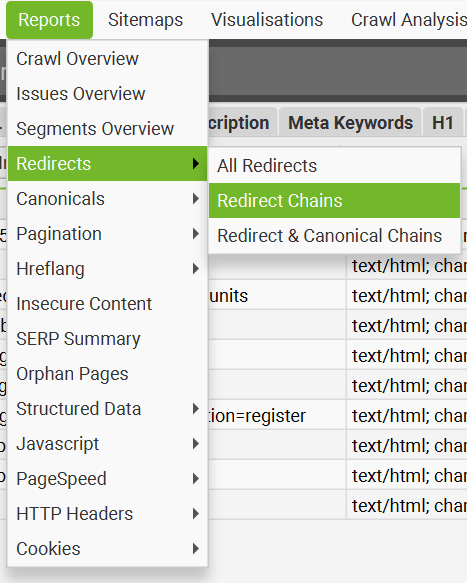
For orphan pages and redirect chains, go to the reports tab directly inside Screaming Frog and you will see dedicated options for both. Export those reports and you now have everything you need in one place to start fixing issues systematically.
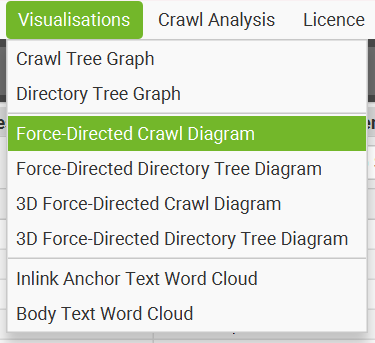
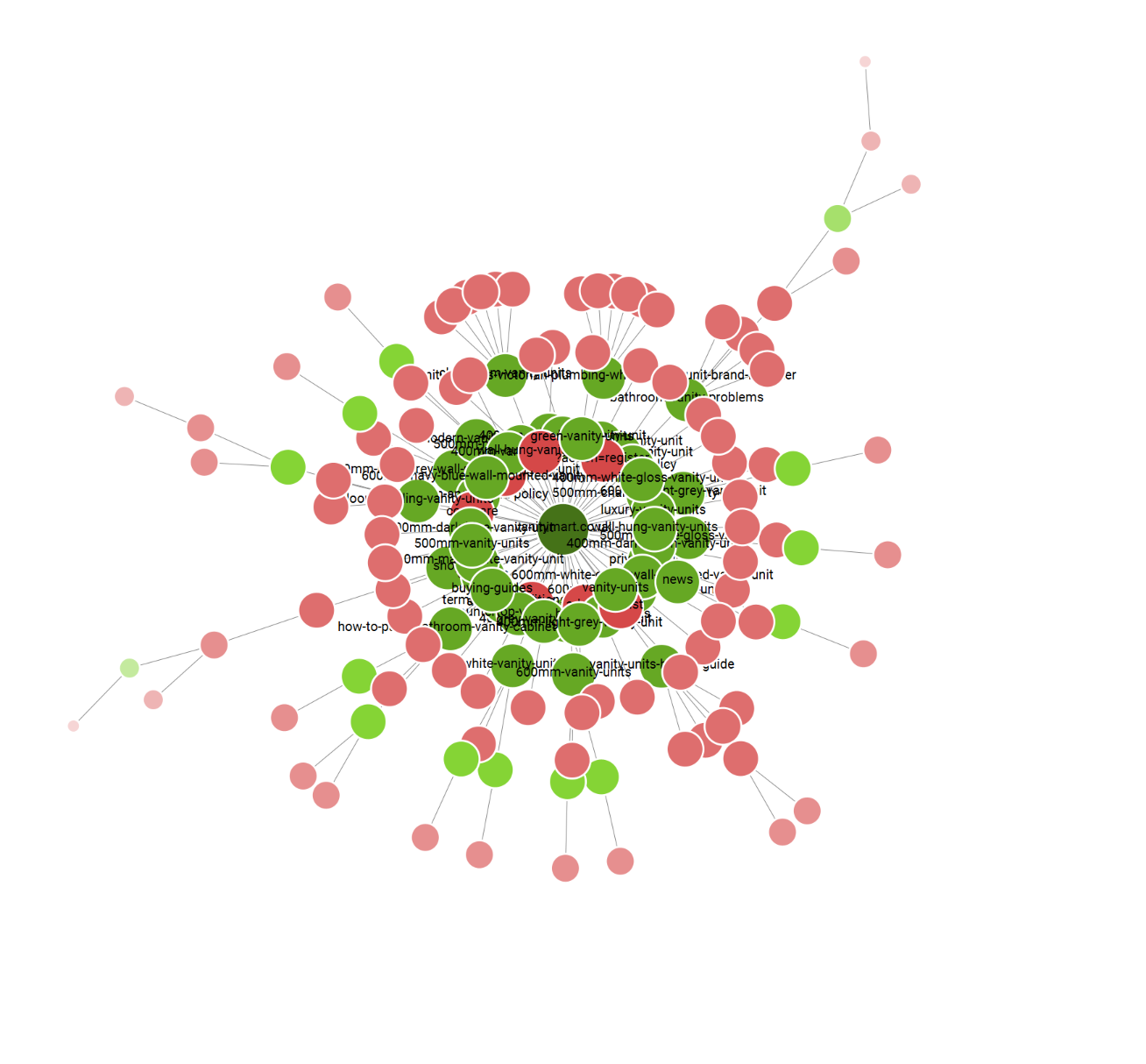
Once you have your reports exported, switch over to the Visualisations tab and run the Force-Directed Crawl Diagram. This gives you a bird’s eye view of your entire site structure in one glance.
Green nodes are healthy pages, red nodes have issues, and pages floating on the outer edges with thin lines connecting them are your orphan or near-orphan pages. Use this alongside your exported reports to prioritize which issues to tackle first. A healthy site shows a tight cluster of mostly green nodes with very few isolated pages on the edges.
For the actual fixing work, I recommend using AI like Claude or ChatGPT. Feed it your exported data and it can help you prioritize anchor text diversification, map out redirect chain fixes, and identify which orphan pages need internal links most urgently. It saves a significant amount of time compared to working through spreadsheets manually.
For broken links specifically, the fix is either restoring the missing page at its original URL, updating the link to point to a relevant existing page, or removing it entirely. A 301 redirect is another valid option but should be combined with updating the source link directly so equity does not pass through an unnecessary hop.
Once broken links are resolved, cross-reference your orphan page list with organic traffic data from Google Search Console. Orphan pages that already attract some traffic despite having no internal support are the highest-priority targets, because they are clearly capable of ranking and would almost certainly perform better with a few relevant links pointing to them.
Pages with zero traffic and no internal links are lower priority but should still be addressed to keep the site structure clean. Fix everything in order of priority starting with high-traffic pages identified in Google Search Console, and reaudit every 4 to 6 weeks to catch new issues before they compound.
Measuring the Success of Your Internal Linking Strategy
The most direct indicator of internal linking performance I have noticed is keyword position. When you add internal links to a page that needs a boost, you will almost immediately see movement in the keyword positions that page is targeting.
That position improvement then feeds into overall site traffic, which is the second thing I watch. SEMrush research identified session duration and pages per session as two of the most important ranking factors, both of which a solid internal linking strategy directly improves by guiding users from one relevant piece of content to the next.
Bounce rate is another useful signal. If users are landing on a page and leaving without clicking anywhere, your internal links may not be relevant or visible enough to keep them moving through the site.
Every week I check Search Console and SEMrush to see what changed. Where was a page ranking last week, where is it now, what moved and what did not.
I also look at overall impressions and clicks. Impressions are often dismissed as a vanity metric but they still matter. A jump in impressions usually signals that Google is starting to show your pages for more queries, which is an early sign that your internal linking changes are working before the ranking movement fully kicks in.
For results, I focus on rankings and traffic first. Conversions follow naturally from there. Better rankings bring more traffic and more traffic brings more conversions.
As for how long it takes, I typically see movement within 2 to 4 weeks, but that applies mostly to sites with strong off-page signals like an active backlink profile or social media presence.
For a newer site with low authority, expect it to take closer to 4 to 8 weeks before you see meaningful movement, which aligns with broader SEO timeline expectations for newer domains.
Do not make the mistake of changing your internal links again before that window closes just because you have not seen results yet.
Frequently Asked Questions
Does internal linking directly improve rankings?
Internal linking is not a direct ranking factor like backlinks. It plays an indirect role by distributing authority between pages, improving crawlability and indexation, signaling topical relevance through anchor text, and enhancing user experience. Get those four things right and ranking improvements follow naturally.
How often should I update my internal links?
Reaudit every 4 to 6 weeks as a baseline. When new pages break into the top 3 to 5 positions, point their internal links toward lower authority pages that need a boost. Internal links are not a one-time setup, they should shift as your rankings evolve.
Can internal links hurt my SEO?
Yes, in four specific ways: over-optimizing anchor text looks spammy, pointing links toward wrong pages wastes authority, excessive linking dilutes PageRank, and linking to low-value pages wastes crawl budget. All four are avoidable once you audit with intention rather than linking randomly.
Do internal links on new sites work the same way?
Not quite. New sites have little to no authority, so internal links serve discovery, crawlability, and indexation rather than authority distribution. Keep it to 2 or 3 links per page early on and focus on building authority through content and backlinks first.
What is the best anchor text strategy for internal links?
Anchor text should be natural and descriptive. Aim for roughly 60 to 70% partial match, 20% branded, and less than 10% exact match, a ratio I follow consistently and one that applies equally to backlinks. Avoid leaning too heavily on exact match phrases or Google may read it as over-optimization.
What is the internal linking strategy for ecommerce sites?
Interlink collection pages with each other, link between blogs, and link from blogs to collection and product pages. I personally avoid internal links inside product description copy since product pages exist for conversion and adding links gives users a reason to leave before they buy. Sidebar and widget links on product pages are fine.
Should every page have internal links pointing to it?
Every page you want indexed and ranked needs at least one internal link pointing to it. Orphan pages receive no link equity and are unreachable through normal navigation, which is why they rarely rank competitively. The only exception is pages intentionally excluded from the site structure like PPC landing pages blocked from indexing.
Is it better to have more internal links or fewer higher quality ones?
Fewer, more relevant links consistently outperform a large number of loosely relevant ones. Every link you add dilutes the equity passed by every other link on that page. A small number of well-placed contextual links with descriptive anchor text will always do more than a page cluttered with links added just to hit a number.
How do I create topic clusters with internal linking?
Start with a pillar page covering a broad topic, then create supporting pages on subtopics that each link back to the pillar. The pillar links out to every supporting page, and closely related supporting pages link to each other where relevant. This tells Google your pillar is the most authoritative resource on that topic.